AI Tools for Daily Workflow 2026: My Exact System Using 5 Free AI Tools
AI tools for daily workflow 2026 don’t need a subscription stack that costs more than your phone bill. I run my entire day on five apps. All five are free. Not “free trial.” Free.
Here’s the annoying truth about most “best AI tools” articles: half of them are wrong the day they publish. I found a roundup from earlier this year still calling Notion AI “free for daily use.” It isn’t — you get 20 AI responses total, not monthly, forever, until you upgrade. That’s not a workflow. That’s a demo with a countdown timer.
So instead of another recycled list, here’s what I actually run. Hour by hour. Free tier by free tier, checked this month, not last year.
Quick context: I run a two-person content studio. Client onboarding, editorial calendars, invoice follow-ups — a lot of small, repetitive decisions every single day. Eight months ago, my mornings started with 40 minutes of just sorting what needed doing. Now that’s down to about ten minutes. Everything below is the real stack behind that change, not a wishlist.
Table of Contents
Who This Workflow Is For (And Who Should Adjust It)
New to AI tools entirely? Start with just the first two steps this week. Add the rest once those feel automatic.
Already a heavy AI user? Skip to the comparison table below and swap in whichever piece you’re missing.
Running a small business? Pay close attention to the “What I Never Let AI Touch” section. It matters more for you than anyone else here.
The Problem With Every “Best AI Productivity Apps 2026” List
Most of these roundups share the same eight tools, reshuffled with new adjectives.
They rarely open the pricing page before hitting publish.
Case in point: Notion’s AI add-on quietly disappeared for Free and Plus users in 2025, replaced by a one-time trial. Reclaim.ai’s free plan has shrunk more than once since it launched. None of that shows up in articles written even four months ago.
That’s the actual gap in this whole niche: a workflow built only on tools that are still, verifiably, free right now — not tools that used to be free, or tools with a “free” label and a hidden expiration date.
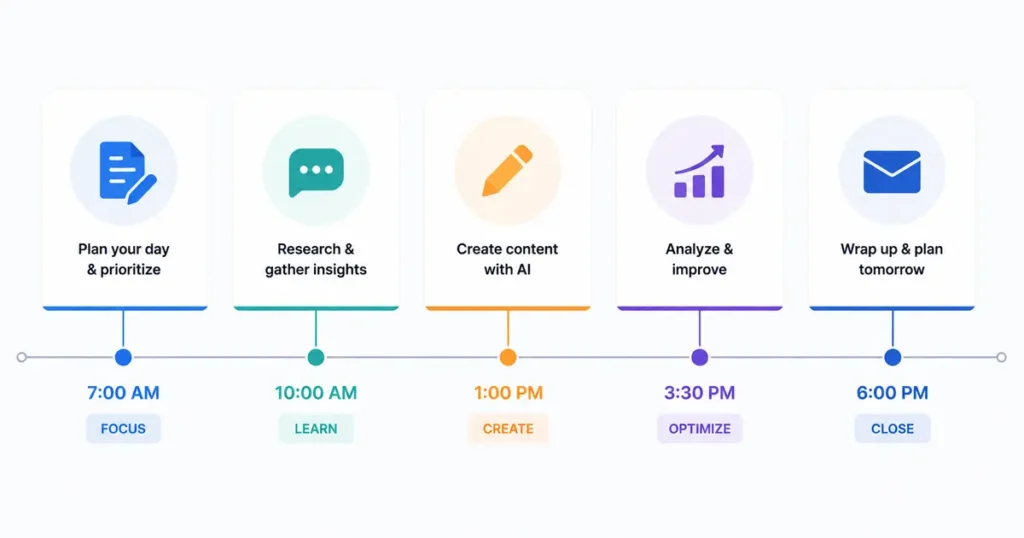
My Exact Daily Workflow, Hour by Hour
I’m not going to pretend this is a rigid system. Some mornings it’s 7am. Some mornings it’s 9am, coffee in hand, kid already late for school. But the order and the tools stay the same.
7:15 AM — Brain-Dump With ChatGPT
First thing, before email, I open ChatGPT and dump everything in my head into one message. Half-formed ideas, deadlines, that thing I forgot to reply to.
I ask it to sort the mess into three buckets: urgent, important-not-urgent, and “can wait.” That’s the whole prompt. No fancy prompt engineering required.
The free plan gives you roughly 10 messages every 5 hours on its everyday model before it drops you to a lighter version — plenty for a five-minute planning session. OpenAI’s own help center keeps the current numbers updated, since they shift. US free users now see occasional ads too, which feels like a fair trade for zero dollars.
8:00 AM — Inbox Triage With Gemini
Gemini already sits inside Gmail and Docs on a personal Google account, so there’s nothing new to install. I use it to summarize long threads and draft first-pass replies before I’ve even finished my coffee.
I never send its draft as-is. I read it, cut the corporate-sounding filler, and hit send in my own voice.
9:30 AM — Meeting Prep With Gemini Notebook
This one used to be called NotebookLM — Google renamed it Gemini Notebook mid-2026, same free tier underneath. I load client briefs, past emails, and call transcripts as sources, then ask it questions before meetings instead of re-reading everything myself.
The free “Standard” tier gives you 100 notebooks, 50 sources per notebook, and 50 chat questions a day. Google’s help center has the full breakdown. I’ve never come close to the daily cap doing normal client work.
My favorite feature: the audio overview. It turns a stack of documents into a ten-minute spoken summary I listen to on the school run.
All Day — Calendar Defense With Reclaim.ai
This is my answer to every “AI task management tools 2026” listicle that promises a magic scheduler. Reclaim’s free Lite plan — technically “Reclaim.ai from Dropbox” now, after the 2024 acquisition — auto-blocks time for tasks around my calendar and protects a couple of recurring habits, like the gym and school pickup, without me touching anything.
The free tier is genuinely limited: one calendar sync, a one-week scheduling window, and a small cap on smart meetings. It’s enough for a solo operator. It stops being enough the moment you need to coordinate a whole team’s calendars.
4:45 PM — Final Polish With Grammarly
Before anything client-facing goes out — proposals, invoices, awkward “just checking in” emails — it runs through Grammarly. Free plan, no card on file.
It catches tone before tone catches me a client. The free tier includes grammar, spelling, and tone detection, plus roughly 100 AI prompts a month, which covers a normal week of client writing without hitting a wall.
The 5 Free AI Tools for Productivity, Side by Side
This is what actually separates a real stack from another “best free AI tools 2026” roundup: knowing exactly where each tool’s free tier stops.
| Tool | Best For | Real Free-Tier Limit (2026) | When I Use It |
|---|---|---|---|
| ChatGPT | Morning brain-dump & prioritizing | ~10 messages / 5 hrs, ads for US free users | 7:15 AM |
| Gemini (Gmail & Docs) | Inbox triage, fast drafts | Built into personal accounts, no separate signup | 8:00 AM |
| Gemini Notebook (ex-NotebookLM) | Meeting prep, source-grounded research | 100 notebooks, 50 sources each, 50 chats/day | 9:30 AM |
| Reclaim.ai (Lite) | Calendar defense, auto-scheduling | 1 calendar sync, 1-week range, capped smart meetings | All day, background |
| Grammarly | Final read-through before sending | Grammar + tone + ~100 AI prompts/month | 4:45 PM |
Why Five Tools, Not Fifteen
Every week, a new AI app promises to replace this whole stack in one dashboard.
I’ve tried a few. Here’s what happens: switching costs eat the time savings. Every new tool means new logins, new prompts to relearn, new edge cases to debug.
Five tools, used the same way daily, beat fifteen tools used occasionally. Boring wins here.
How to Use AI for Time Management Without Losing Control of Your Day
This is the part most guides skip: AI doesn’t manage your time. It removes the friction around you managing it. Big difference.
A few rules I actually follow:
- Automate the sorting, not the deciding. Let AI cluster your tasks. You still choose what’s genuinely urgent.
- Protect one deep-work block before anything else gets scheduled. Reclaim does this automatically once you set it up.
- Review AI drafts before they leave your outbox. Every time. No exceptions, ever.
- Set a hard stop for “planning.” Ten minutes with ChatGPT, then close the tab. Planning can eat your whole morning if you let it.
The 2026 Stanford HAI AI Index found organizational AI adoption hit 88% this year — but the productivity gains are landing unevenly, concentrated among people who’ve built a repeatable process instead of just opening a chatbot when they remember to. A system beats a subscription.
What I Never Let AI Touch
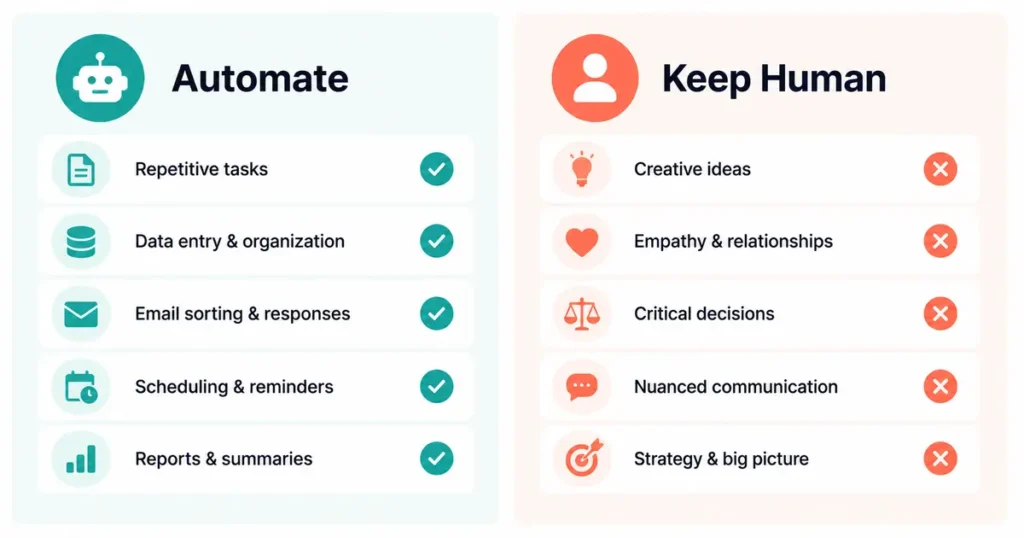
Some parts of the day stay human. Full stop.
- Anything with a client’s financial details. Free-tier tools aren’t the place for contracts, real invoice numbers, or anything you’d hesitate to post publicly.
- Difficult conversations. AI can draft a “let’s push the deadline” email. It should never draft a “we’re ending this contract” one.
- Passwords, keys, anything sensitive. Obvious, but worth saying twice.
- The final send on anything irreversible. A read-through by an actual human — you — stays non-negotiable.
For a deeper breakdown of what’s safe to hand a free AI tool versus what isn’t, see data privacy for small business AI tool.
→ See also: AI Tools That Save the Most Time in 2026 (Ranked by Hours)
The ROI Math for Small Business Owners
I’m not handing you a fake universal number, because your day isn’t my day. Here’s my actual math instead.
Cutting my morning sort from 40 minutes to 10 saves roughly 30 minutes a day. Across a five-day week, that’s 2.5 hours. Over a year, minus holidays, that’s somewhere around 115 hours — nearly three full workweeks, recovered from a stack that costs zero dollars.
Run your own numbers before you believe anyone’s, including mine. Time your current morning routine for three days. Compare it after a week of this stack. The difference is the only ROI figure worth trusting.
If you’re weighing whether to automate scheduling first or writing first, which task to automate first as a small business walks through that decision in more depth.
→ See also: Free AI Writing Tools That Require No Sign Up in 2026
Common Mistakes When Building an AI Daily Workflow
- Turning on five tools in one day. Add one at a time. Give each a full week before judging it.
- Ignoring the reset clock. ChatGPT’s free tier resets every 5 hours. Notion’s free trial never resets at all. Know which one you’re dealing with.
- Feeding sensitive data into whatever’s open in a tab. Match the tool to the sensitivity of the task, not the other way around.
- Skipping the human read-through. The fastest way to lose a client’s trust is an AI-drafted email that reads like one.
- Treating the first draft as the final draft. It never is. Not from AI, not from a human either.
Frequently Asked Questions
What’s the best free AI tool for daily productivity in 2026?
There isn’t one single “best” — the strongest free stack pairs a chat assistant (ChatGPT or Gemini) for thinking and drafting with a dedicated scheduler like Reclaim.ai for calendar defense. Using one tool for everything is where most people hit a wall.
Can you really run a full workflow on free AI tools, or do you need to pay eventually?
You can run a genuinely useful daily workflow entirely free as a solo operator or very small team. Free tiers get tight once you add teammates, higher volume, or need advanced scheduling — that’s usually when a $10–20/month upgrade starts paying for itself.
How much time can AI actually save in a workday?
It depends entirely on how repetitive your current tasks are. My own mornings dropped from about 40 minutes of manual sorting to roughly 10 — your results will vary based on your role and workload.
Is it safe to use free AI tools for small business tasks?
For drafting, brainstorming, and scheduling, generally yes. For anything involving client financial data, contracts, or sensitive personal information, treat free-tier tools with caution and check each provider’s data-retention policy first.
Which AI tool is best specifically for time management?
Reclaim.ai’s free Lite plan is built specifically for calendar defense and auto-scheduling, making it the closest thing to a dedicated AI task management tool in this list. ChatGPT and Gemini support time management indirectly, through planning and prioritizing rather than actual scheduling.
Do free AI tools have hidden limits I should know about?
Yes, and they change often. Notion AI’s “free” plan is a one-time 20-response trial, not a recurring allowance. Always check a tool’s current pricing page before building a workflow around it — what was free in January isn’t guaranteed to stay free in July.
How do I know when it’s time to upgrade from the free tier?
When you’re consistently hitting a cap — a message limit, a scheduling window, a monthly prompt count — more than twice a week. Occasional overflow is normal. Weekly overflow means the free tier isn’t built for your workload anymore.
Five tools. One order. Repeated every day until it’s boring — which, honestly, is the whole point. Boring means it’s working.
Want more practical AI guides for small business owners? Browse our full library at GetFuturix.com.
Related articles on GetFuturix: