GetFuturix Team
How to Use ChatGPT for Homework Ethically in 2026: A Student’s Complete Guide
Nine out of ten college students now use AI for schoolwork, and most have no idea where the ethical line actually sits. If you’ve been searching for how to use ChatGPT for homework ethically, you’re already ahead of most of your classmates — you’re asking the right question instead of just guessing. This guide breaks it down for 2026: real prompts, real detection-risk data, and a framework you can apply tonight.
Short answer: using ChatGPT ethically for homework means using it to support your own thinking — brainstorming, explaining, revising — instead of letting it produce work you submit as your own, and disclosing its use whenever your school asks you to.
I’ve spent the last few months testing AI study tools against real assignments, reading the academic-integrity policies schools have quietly rewritten several times since 2023, and digging through the peer-reviewed research on what these tools actually get wrong. Here’s what actually holds up.
Table of Contents
What “Using ChatGPT for Homework Ethically” Actually Means
Ethical AI use isn’t one universal rule, because there isn’t one. It comes down to three things: what your school allows, what you disclose, and whether the final work still represents your own thinking.
Here’s the test I use: if you removed ChatGPT from the process entirely, would you still have done the assignment — just slower? If yes, you’re using it as a tool. If the honest answer is “no, ChatGPT basically did it,” that’s where ethics, and most school policies, draw the line.
A quick self-check, drawn from how most current university policies are actually written:
- Did I generate the ideas, or did ChatGPT generate them for me?
- Could I explain every sentence if my instructor asked me to, right now, out loud?
- Would I be comfortable telling my instructor exactly how I used AI on this assignment?
If you answered “no” to any of these, it’s worth rethinking your approach before you submit.
The Traffic-Light Framework: What’s Green, Yellow, and Red
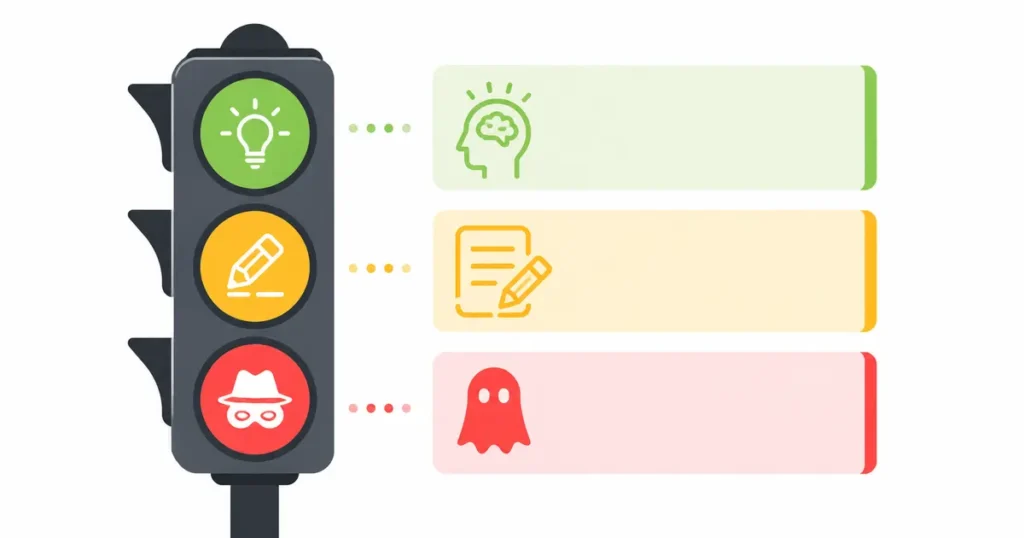
Most “use AI ethically” advice stays vague. Here’s a more concrete breakdown — the way I’d actually explain it to a student sitting next to me.
| Zone | What it looks like | Examples |
|---|---|---|
| 🟢 Green — almost always fine | AI supports your thinking, doesn’t replace it | Brainstorming, concept explanations, proofreading your own draft, practice quizzes |
| 🟡 Yellow — depends on your school’s policy | AI does meaningful cognitive work; disclosure is usually required | Generating an outline, rewriting a paragraph for clarity, summarizing a source |
| 🔴 Red — academic dishonesty almost everywhere | AI produces work submitted as entirely your own | Having ChatGPT write your essay, copying solved problem sets verbatim, fabricated citations |
The yellow zone is the biggest and the blurriest, and it’s exactly where most disclosure requirements now live. 7 Best Free AI Tools to Summarize Textbooks (2026 Guide) for a deeper breakdown of writing an AI-use disclosure statement your instructor will actually accept.
7 Ways How to Use ChatGPT for Homework Ethically (Chatgpt study mode)
These are the uses that show up again and again in university writing-center guidance, and that actually hold up when tested against real assignments.
1. Brainstorming and Narrowing a Topic
A blank page is the hardest part of any assignment. Ask ChatGPT for several possible angles on your topic, then pick the one that’s genuinely yours to argue.
Try this prompt: “I’m writing about [broad topic] for a [grade level] [subject] class. Give me five specific, narrower angles I could argue — not a summary of the topic itself.”
2. Explaining Concepts You’re Stuck On
This is where ChatGPT genuinely earns the “tutor” comparison. Feed it a confusing paragraph from your textbook and ask for a plain-language explanation, then ask it to check whether you understood it correctly.
- Ask for an explanation “like I’m in [your actual grade],” not generically simplified
- Follow up with “now quiz me on this” to test whether it actually stuck
- Ask “what’s a common mistake students make with this concept?” — it’s usually accurate and genuinely useful
3. Using Study Mode as a Built-In Tutor
OpenAI’s Study Mode, now free for all logged-in users, is the most useful 2026 update for homework help specifically. Instead of answering directly, it asks guiding questions and walks you through problems step by step — closer to how a real tutor works than a standard search.
To turn it on, type @study in the message box or select Study from the tools menu. It won’t stop you from copying a final answer if you’re determined to, but it’s built to make that harder to do by accident. You can read OpenAI’s own explanation of how it works on the official Study Mode page.
Study Mode is designed to help you learn the material. For graded work, you’re still expected to follow your school’s specific AI policy on top of it.
4. Building an Outline, Not a Draft
Ask for a structural outline — thesis, three supporting points, a counterargument, a direction for your conclusion — then write every sentence yourself. This is the highest-value yellow-zone use: it saves real time without outsourcing the actual writing.
5. Proofreading and Style Feedback
Paste your own draft and ask ChatGPT to flag unclear sentences, tone shifts, or repetitive phrasing, not to rewrite it wholesale. Ask it to explain why something isn’t working rather than just fixing it, so you actually improve as a writer over time.
6. Generating Practice Questions and Quizzes
Before a test, paste your notes and ask for practice questions at increasing difficulty. This turns passive review into active recall, which is the study technique with the strongest research backing behind it.
7. Debugging and Explaining Code
For programming homework, ask ChatGPT to explain why your code is failing before asking it to fix it. Most computer science departments treat “explain this error” as acceptable help and “write this function for me” as a violation, so know which side of that line your assignment sits on.
The Citation Trap: Why You Can’t Trust ChatGPT’s Sources
This is the gap in almost every “use AI for homework” guide, and it’s the single most common way students get into real trouble — not from writing help, but from citations.
The peer-reviewed research on this is blunt. Early studies found that a large share of GPT-3.5’s academic citations were completely fabricated, and even GPT-4 still invents a meaningful share of them: fake papers, fake DOIs, real journals with article titles that don’t exist anywhere. A 2026 analysis of published research found fabricated citations now showing up in roughly 1 in every 277 papers, six times more often than three years earlier.
Why this matters for homework, not just published research:
- A confidently formatted citation looks completely real — author names, years, journal titles, sometimes even a working-looking DOI
- ChatGPT can’t warn you when it’s invented one, because it has no way of “knowing” that it did
- Submitting a single fabricated source is an academic-integrity violation even if every other sentence in your paper is entirely your own writing
The fix is simple, but non-negotiable: never submit a ChatGPT-generated citation you haven’t personally verified in Google Scholar, your library database, or the publisher’s own site. If you can’t find it independently, treat it as if it doesn’t exist. The underlying peer-reviewed data on citation fabrication rates is available in this NCBI-published study, if you want to see the numbers yourself.
Free AI Writing Assistant Options for Students in 2026
A free AI writing assistant for students means different things depending on the tool, and “free” is doing a lot of work in most marketing copy. Here’s what you actually get without paying, based on current 2026 tiers.
| Tool | What’s free | Best for |
|---|---|---|
| ChatGPT (free tier) | Limited daily messages, Study Mode fully free, basic web browsing | Brainstorming, tutoring, concept explanations |
| Claude (free tier) | Limited daily messages, strong long-document handling | Essay feedback, analyzing dense readings |
| Perplexity | Free for verified students for 12 months | Research with citations attached to every claim |
| Grammarly | Free grammar and clarity checks | Line-by-line proofreading |
| QuillBot | Free paraphrasing and grammar checks, daily limits | Rewording your own sentences for clarity |
A free AI writing assistant works best as a stack, not a single tool. Draft your ideas yourself, use ChatGPT or Claude to pressure-test your argument, then run a final grammar pass through Grammarly or QuillBot before you submit anything.
Best AI Tools for Research Papers (When ChatGPT Isn’t Enough)
ChatGPT is a decent starting point for research, but it isn’t built for it. It doesn’t search academic databases by default, and as covered above, it genuinely can’t be trusted to cite sources accurately. The best AI tools for research papers are built specifically for academic workflows, and they consistently outperform general chatbots on it:
- Perplexity (Academic mode) — cites a source for every claim, so you can verify as you go instead of after the fact
- NotebookLM — upload your own readings and it answers questions using only those sources, which removes the hallucination problem almost entirely
- Elicit — extracts specific data points (sample size, methodology, findings) across dozens of papers at once, genuinely useful for literature reviews
- Semantic Scholar — free academic search engine with citation graphs, better for finding papers than for summarizing them
For a standard research paper, pair Perplexity for initial source discovery with NotebookLM for working through the sources you’ve actually collected.
Best AI Note-Taking Tools for Students in 2026
When students ask me what the best AI note taking for students actually looks like in practice, it usually comes down to one of three tools, depending on what you’re taking notes from — and all three pair naturally with ChatGPT for the study phase that follows.
- NotebookLM — the strongest free option for turning readings, PDFs, and lecture recordings into searchable, source-grounded notes; every answer links back to the exact passage it came from
- Otter.ai — best for live lecture transcription in real time, with a generous free monthly minute allowance
- Notion AI — best if your notes, task list, and assignment tracker already live in Notion; it organizes and cleans up notes you’ve already written rather than generating them from a blank page
None of these replace taking notes yourself during class. They replace the hour you’d otherwise spend rewriting messy notes afterward.
Will Your Teacher Know? The Truth About AI Detection in 2026
This is the question every student actually wants answered, so here’s the honest version instead of the reassuring one.
Detection tools like Turnitin, GPTZero, and Copyleaks are built directly into the platforms most schools already use, and they run automatically on submitted work. Instructors see the AI-likelihood score; students usually don’t.
Here’s what the accuracy data actually shows:
- Vendors report high accuracy in their own testing, with claims around 87% sensitivity for Turnitin and into the 90s for others
- Independent research paints a messier picture, with false-positive rates of roughly 4–9% on genuinely human-written work
- Non-native English writers get flagged as AI-generated at dramatically higher rates than native speakers across multiple studies, because their sentence patterns read as more “predictable” to these detection models
Because of those false-positive rates, a growing number of institutions, including some flagship universities, have disabled automated AI detection entirely and rely on writing-process evidence instead: document version history, drafts, and in-class writing samples. A detection flag is a signal for a human to review, not proof of anything on its own.
A newer alternative worth knowing about is C2PA Content Credentials — a tamper-evident system that tags content with its creation source at the moment it’s made, similar to how some cameras now watermark photos. It’s still early, but it’s the direction detection is heading: provenance instead of guesswork.
Practical takeaway: the safest position isn’t hoping a detector misses your work. It’s using AI in ways your school actually permits and keeping evidence of your own process on hand in case anything ever gets questioned.
How to Find Out Your School’s Actual AI Policy
Policies vary enormously, even between departments at the same school, so asking your professor directly beats any general advice here. That said, most current policies fall into one of three patterns.
- Restrictive — AI detection tools are actively used, and unauthorized AI use is treated as a straightforward integrity violation
- Disclosure-based — the most common model in 2026; AI use is permitted for certain stages of work (brainstorming, editing) as long as it’s disclosed alongside the assignment
- Embrace — some programs now require AI-literacy coursework and build assignments assuming AI use, then grade the parts AI genuinely can’t do: critical analysis, in-class defense of your reasoning
Harvard’s official guidance is a useful example of how a major institution frames this. It tells students to check their specific school’s own academic-integrity policy, since Harvard’s individual schools each set additional rules on top of the university-wide baseline. You can read that guidance directly on the Harvard Office of the Provost’s page.
How to Disclose AI Use in Your Work
If your school’s policy requires disclosure, and increasingly it does, keep the statement simple and specific. A vague line like “AI was used” doesn’t hold up well if it’s ever questioned.
A disclosure statement that actually protects you looks something like this:
“I used ChatGPT to generate three possible essay outlines, of which I selected and expanded one. All analysis, argumentation, and final writing are my own. I used Grammarly for a final proofreading pass.”
Both APA and MLA now publish official guidance on citing AI tools as a source whenever their output is directly quoted or closely paraphrased in your work. Treat it the same way you’d treat any other source you didn’t originate yourself.
Mistakes That Turn Ethical AI Use Into Academic Dishonesty
Most violations I’ve come across aren’t students deliberately trying to cheat. They’re students who didn’t realize exactly where they’d crossed a line. Watch for these specifically:
- Submitting AI text with only light edits. Changing a few words doesn’t make AI-generated writing yours; the ideas and structure still aren’t.
- Using AI-generated citations without checking them. Even one fabricated source can trigger a full academic-integrity review.
- Skipping disclosure when your syllabus requires it. Non-disclosure is often treated as more serious than the AI use itself.
- Using AI on assignments explicitly designed to test unassisted work, like in-class essays, closed-book problem sets, or timed responses.
- Assuming a “humanizer” tool protects you. These tools try to lower AI-detection scores, but they don’t change what actually happened, and using one specifically to evade detection is its own red flag if it’s discovered.
FAQs: How to use chatgpt for homework ethically
Is it cheating to use ChatGPT for homework?
Not inherently. It depends on what you use it for: brainstorming and explanation are generally fine, while having it write your submitted work usually isn’t, regardless of the school.
Can teachers tell if you used ChatGPT?
Sometimes, but detection tools carry real false-positive rates, especially for non-native English writers. Many schools now treat a flag as a reason to review your process, not as proof on its own.
Is ChatGPT free for students?
Yes. The free tier includes Study Mode at no cost, though message limits apply during peak hours. Paid tiers, roughly $8–$20 a month, remove those limits and unlock more advanced models.
What’s the best free AI writing assistant for students?
There isn’t one single best option. ChatGPT and Claude both have strong free tiers for brainstorming and feedback, while Grammarly and QuillBot handle line-level editing better than either.
What’s the best AI tool for research papers?
Perplexity for source discovery with citations, paired with NotebookLM for working through the sources you’ve already collected — both outperform general-purpose ChatGPT for academic research specifically.
Can I get in trouble for using AI even if my school allows it?
Yes, if you don’t follow the specific conditions. Most policies require disclosure, restrict which assignment types AI can touch, or both. “Allowed” almost never means “unrestricted.”
Related articles on GetFuturix:
- How to Use ChatGPT for Beginners: The Complete Guide
- How to Fact-Check AI-Written Content (5 Free Methods)
Try these free tools

GetFuturix Team
Sharing practical guides on AI, tools and digital growth.