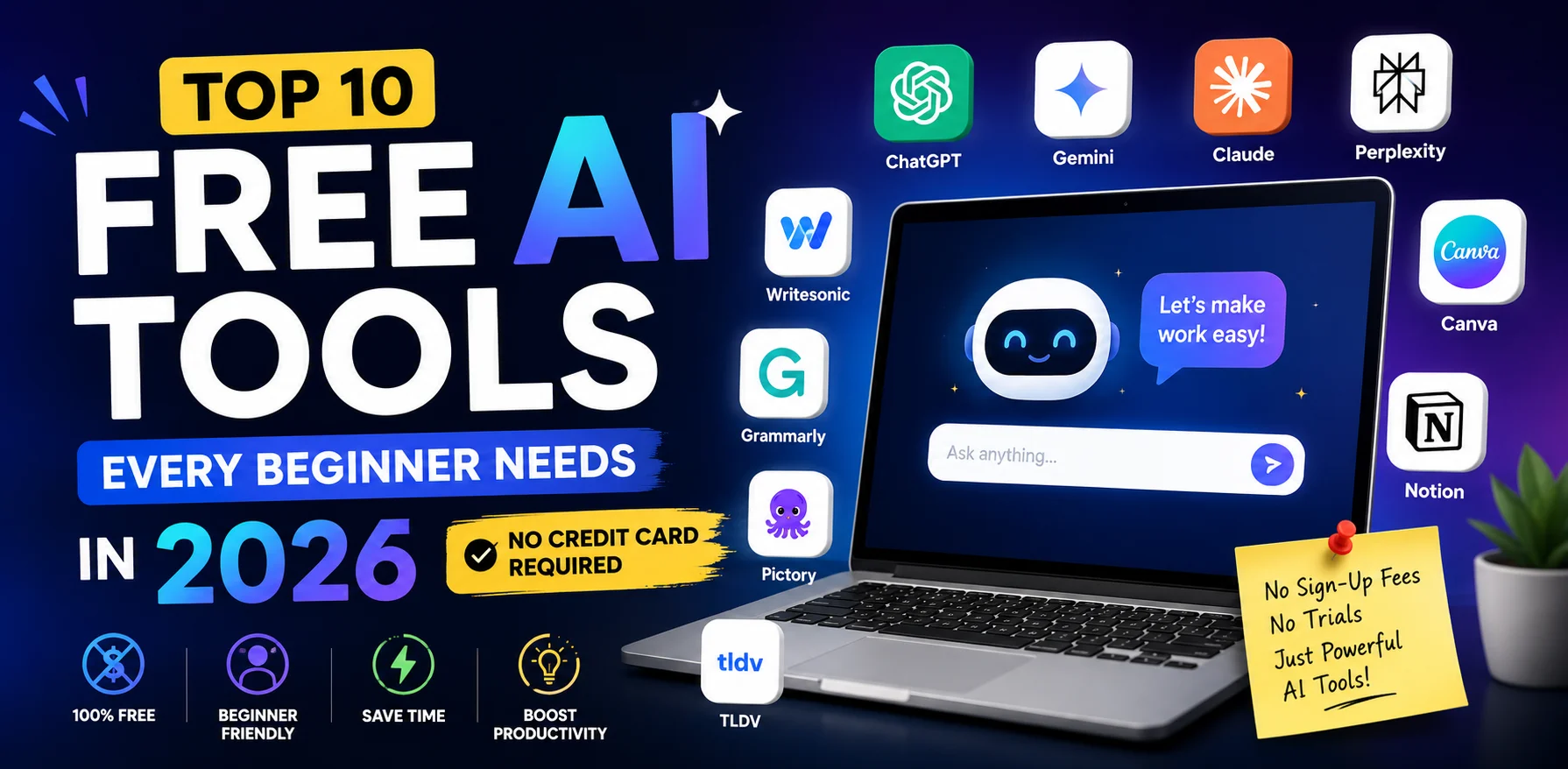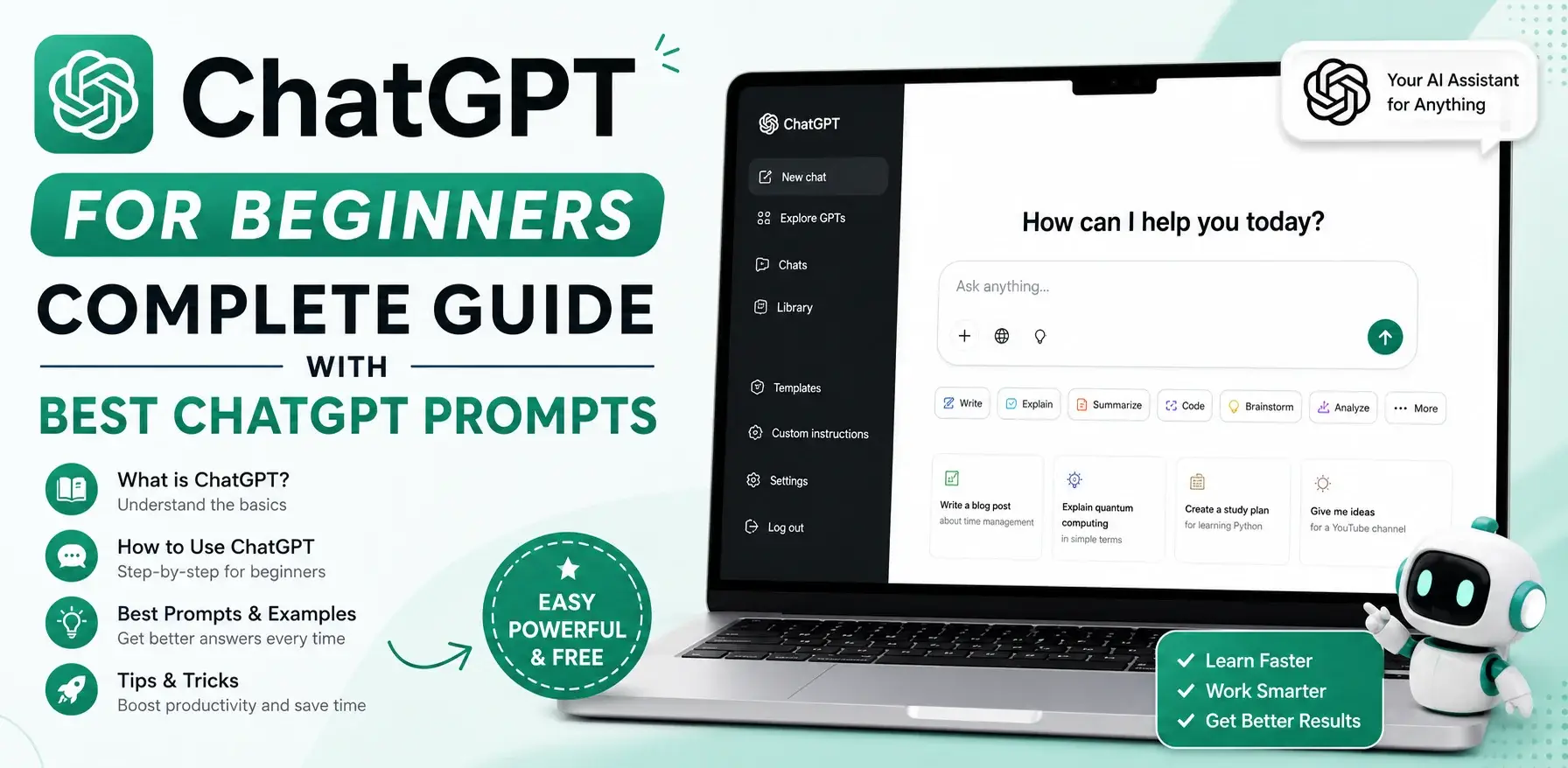
Learning how to use ChatGPT for beginners is the single most valuable skill you can pick up in 2026 — and it takes less than 10 minutes to get started.
If you have been watching everyone around you talk about ChatGPT but have not been sure where to begin, this complete guide to how to use ChatGPT for beginners covers everything: how to set up your free account, how to write effective prompts, how to make ChatGPT write in your own voice, and which free ChatGPT alternatives are worth trying in 2026.
No technical background required. No credit card needed. By the end of this guide to how to use ChatGPT for beginners, you will be using one of the most powerful AI tools in the world — and actually getting results from it.
Table of Contents
What Is ChatGPT and Why Should Beginners Start Here?
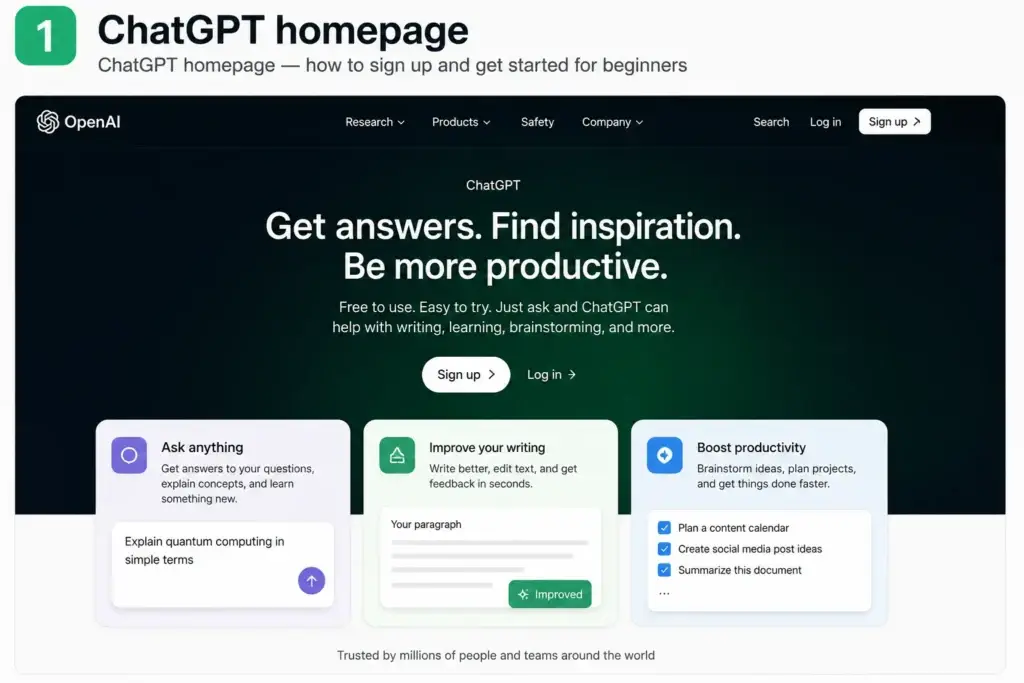
Before diving into how to use ChatGPT for beginners, it helps to understand what you are actually working with.
ChatGPT is an AI assistant created by OpenAI that can understand and generate human-like text. You type a question, instruction, or request in plain English — and ChatGPT responds immediately with a helpful, detailed answer. Think of it as a knowledgeable colleague who is available 24 hours a day, never gets tired, and can help you with almost anything involving written communication.
The reason ChatGPT for beginners is the best starting point in 2026 is simple: it is the most versatile free AI tool available. One single account gives you access to writing assistance, research support, brainstorming, summarisation, code explanation, translation, and more. Every other AI skill you build on top of learning how to use ChatGPT becomes easier because the core concept — describing what you want in plain English — transfers to every tool.
What ChatGPT’s free plan includes in 2026:
- Access to GPT-4o mini (highly capable model) — unlimited
- Access to GPT-4o (the most advanced model) — 40 messages per 3 hours
- Image understanding (upload a photo and ask about it)
- File uploads and analysis
- Memory features (ChatGPT remembers your preferences over time)
Furthermore, no credit card is required to start. You simply create a free account and begin. This is exactly why ChatGPT for beginners is the correct first AI tool to learn — there is no financial barrier and no technical setup.
How to Use ChatGPT for Beginners: Step-by-Step Setup
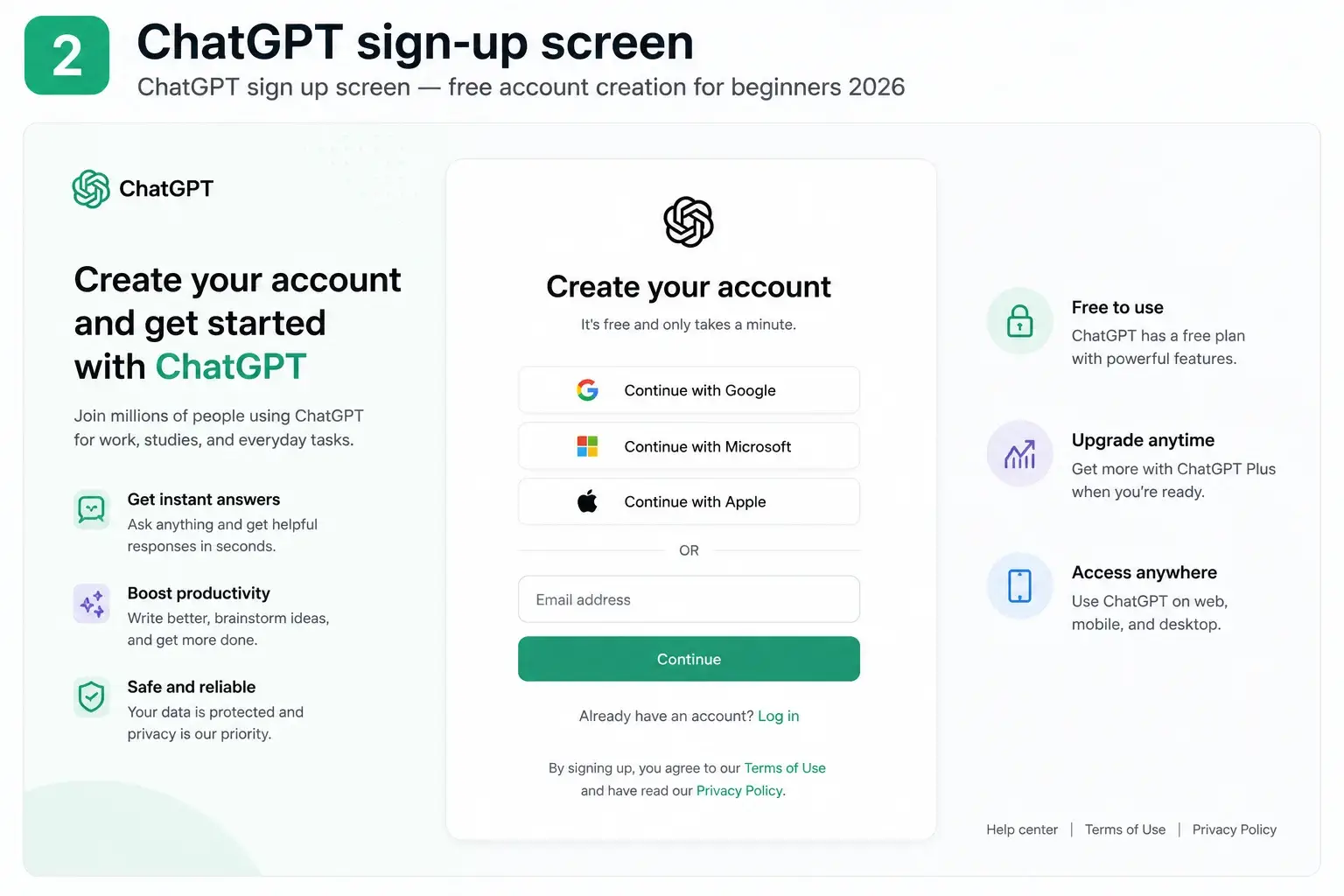
Here is the complete step-by-step process for how to use ChatGPT for beginners, from zero to your first conversation:
Step 1: Go to chat.openai.com
Open any browser on your phone, tablet, or computer and go to chat.openai.com. This is the official ChatGPT website. You do not need to download anything — ChatGPT works entirely in your browser.
Step 2: Create Your Free Account
Click the Sign Up button and enter your email address. Alternatively, you can sign in directly with your existing Google or Microsoft account — this is the fastest option for most beginners and takes under 30 seconds.
After verifying your email, you will be taken directly to the ChatGPT interface. Your account is completely free and there is no trial period. You are not asked for payment information at any point during the free setup.
Step 3: Understand the ChatGPT Interface
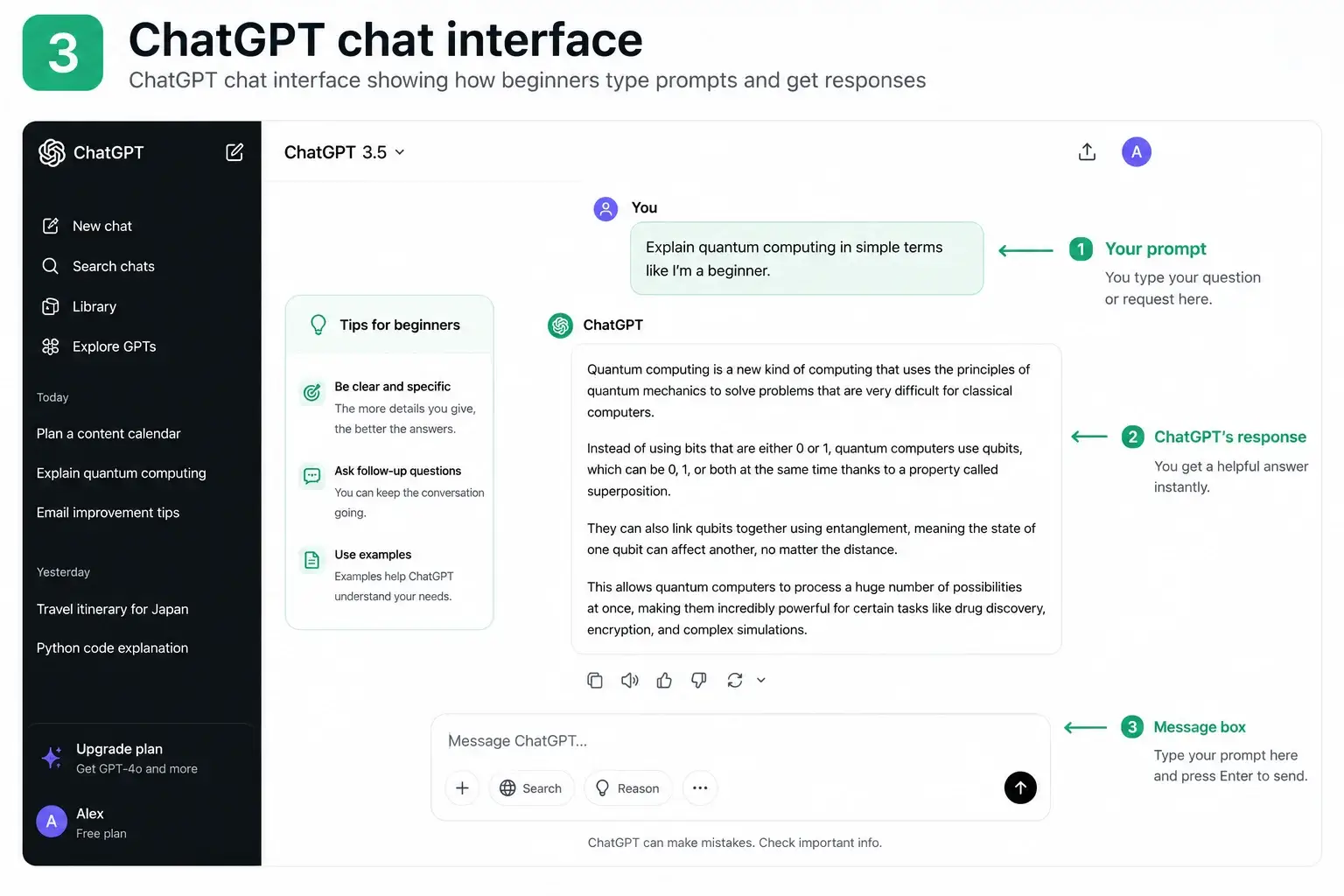
Once you are inside, the ChatGPT for beginners interface is straightforward:
The message box is at the bottom of the screen. This is where you type your request.
The response area is the main space above. ChatGPT’s answers appear here.
New chat button on the left lets you start a fresh conversation whenever you want.
Model selector at the top lets you switch between ChatGPT models (free users get GPT-4o with limits and GPT-4o mini without limits).
Step 4: Type Your First Message
Click the message box and type any question or request. Do not overthink it. For your very first message, try:
“Explain what ChatGPT is in 3 sentences, as if you are talking to a complete beginner.”
Press Enter. ChatGPT will respond within seconds. Congratulations — you now know the basics of how to use ChatGPT for beginners.
Step 5: Have a Conversation, Not Just One Question
The most important thing to understand about how to use ChatGPT effectively is that it is a conversation, not a search engine. After ChatGPT gives you an answer, you can reply with follow-up questions, ask it to change something, request a simpler version, or say “expand on point 2.” ChatGPT remembers everything said earlier in the same conversation thread.
This conversational approach is what separates people who get great results from ChatGPT for beginners from those who are disappointed by their first experience.
How to Write Your First ChatGPT Prompt
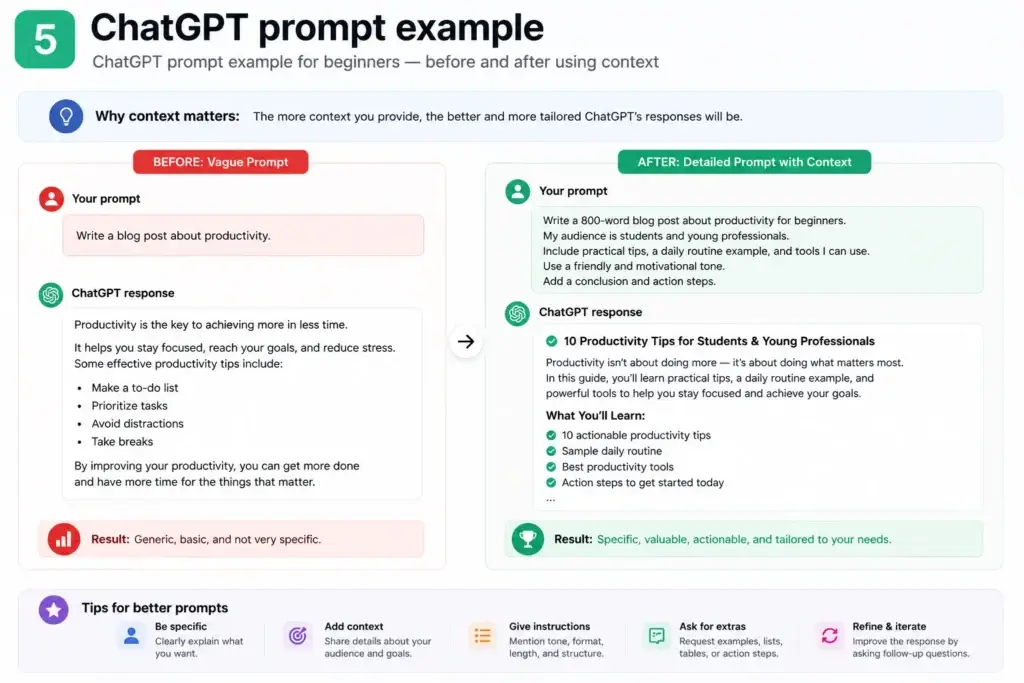
A prompt is the message you send to ChatGPT. Learning how to use ChatGPT for beginners effectively comes down almost entirely to learning how to write better prompts — because the quality of ChatGPT’s output depends directly on the quality of your input.
The Anatomy of a Strong Prompt
Every strong ChatGPT prompt for beginners has three elements:
1. Context — Who are you and what is the situation? 2. Task — What specifically do you want ChatGPT to do? 3. Format — How do you want the output structured?
Weak prompt: “Write an email.”
Strong prompt: “I am a small business owner running a bakery. Write a professional email to my customers announcing that we now offer free delivery on orders over Rs. 1,000. Keep it friendly and under 100 words.”
The second prompt gives ChatGPT context (small business owner, bakery), a clear task (announce free delivery offer), specific details (threshold amount), and format instructions (friendly, under 100 words). The result will be dramatically more useful.
The Golden Rule of ChatGPT Prompts for Beginners
The single most important ChatGPT tip for beginners is this: if you would not get a useful answer from a human colleague with only that prompt, you will not get a useful answer from ChatGPT either. Add context. Be specific. Describe the outcome you actually want.
Additionally, you can always ask ChatGPT to improve its own output. Replies like “Make it shorter,” “Use a more formal tone,” or “Add three more examples” are perfectly valid follow-up prompts and will immediately refine the response.
How to Make ChatGPT Write Like You
One of the most powerful — and most underused — features when learning how to use ChatGPT for beginners is the Custom Instructions setting. This is how you make ChatGPT write like you rather than producing generic AI-sounding text.
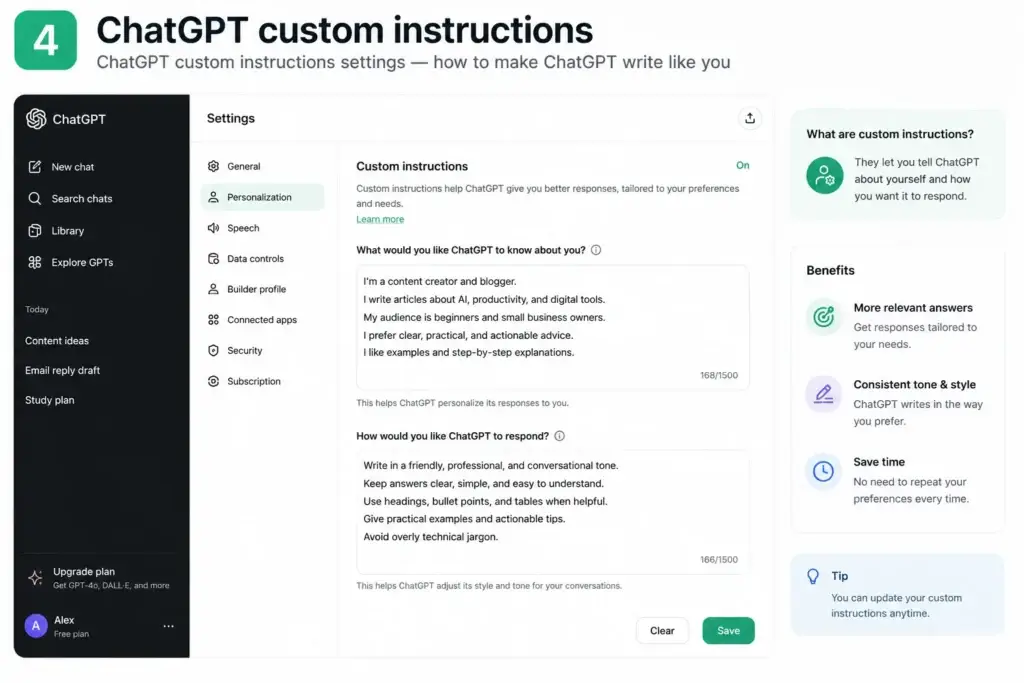
Setting Up Custom Instructions
To access Custom Instructions, click your name or profile icon in the bottom-left corner of ChatGPT and select Custom Instructions. You will see two text boxes:
Box 1: “What would you like ChatGPT to know about you?” Here you tell ChatGPT who you are, what you do, and who your audience is.
Box 2: “How would you like ChatGPT to respond?” Here you describe your communication style, tone preferences, and formatting rules.
Example Custom Instructions to Make ChatGPT Write Like You
Here is a real example you can adapt and use immediately to make ChatGPT write like you:
Box 1 — About you: “I run a small business in Pakistan selling handmade products online. My customers are primarily women aged 25-45. I write in a warm, friendly, conversational tone. I avoid formal language and corporate jargon. I prefer short sentences and paragraphs.”
Box 2 — How to respond: “Always write in my casual, friendly voice. Use short sentences — maximum 20 words each. Never use words like ‘utilize’, ‘leverage’, or ‘delve’. Keep paragraphs to 3 sentences maximum. When writing captions or emails, always end with a question to encourage replies. Never start a sentence with ‘I’ if writing in first person.”
Once saved, every conversation you have will automatically follow these instructions. This single setting transforms ChatGPT for beginners from a generic assistant into something that genuinely sounds like you wrote it.
Furthermore, you can update these custom instructions any time to test different styles and see what resonates best with your audience. Learning how to make ChatGPT write like you through iterating on these instructions is one of the most important advanced ChatGPT tips for beginners you will find anywhere.
Best ChatGPT Prompts for Beginners
The fastest way to see real results when learning how to use ChatGPT for beginners is to start with proven prompts. Below are the most useful ChatGPT prompts for beginners across four everyday categories:
ChatGPT Prompts for Beginners: Writing & Content
These ChatGPT prompts for beginners cover the most common writing tasks:
- “Write a 150-word Instagram caption for [product/topic] in a friendly, conversational tone.”
- “Summarise this article in 5 bullet points: [paste article text]”
- “Rewrite this paragraph to be clearer and more concise: [paste your text]”
- “Write 10 blog post title ideas for a beginner guide about [topic].”
- “Turn these bullet points into a professional email: [paste your bullets]”
ChatGPT Prompts for Beginners: Research & Learning
- “Explain [complex topic] as if I am a complete beginner with no technical background.”
- “What are the 5 most important things a beginner needs to know about [topic]?”
- “Compare [Option A] and [Option B] in a simple table format.”
- “Give me a step-by-step beginner plan to learn [skill] in 30 days.”
- “What questions should I ask when [situation]? Give me 10 examples.”
ChatGPT Prompts for Beginners: Productivity & Planning
- “Create a daily schedule for someone who wants to [goal] while working full time.”
- “Help me break down this big goal into weekly tasks: [describe your goal]”
- “Write a professional to-do list for launching [project] in 4 weeks.”
- “Review this plan and tell me what I might be missing: [paste your plan]”
- “Give me 5 ways to say no to [request] professionally but kindly.”
ChatGPT Prompts for Small Business
ChatGPT prompts for small business owners are among the highest-value uses of this tool. These ChatGPT prompts for small business cover the tasks that take most small business owners the most time:
Marketing & Social Media ChatGPT Prompts for Small Business
- “Write 7 Instagram captions for a [type of business] promoting [product/service]. Mix educational and promotional posts.”
- “Create a 4-week social media content calendar for my [business type] targeting [audience].”
- “Write Google Business Profile responses to these 3 customer reviews: [paste reviews]”
Customer Communication ChatGPT Prompts for Small Business
- “Write a professional but friendly follow-up email to a customer who has not paid their invoice for 30 days.”
- “Create 5 WhatsApp message templates for following up with enquiries from new leads.”
- “Write a refund policy in plain, friendly language for a small online shop.”
Operations ChatGPT Prompts for Small Business
- “Create a simple onboarding checklist for a new employee joining my [type of business].”
- “Write a professional quote/proposal template for [your service type].”
- “Help me write a short job description for [role] at a small [business type].”
Additionally, all of these ChatGPT prompts for small business can be personalised by adding your Custom Instructions first — which means every output will match your brand voice automatically without you having to specify it each time.
ChatGPT Tips for Beginners: Advanced Techniques
Once you have mastered the basics of how to use ChatGPT for beginners, these ChatGPT tips for beginners will help you get significantly better results from every interaction:
Tip 1: Give ChatGPT a Role
Instead of just asking a question, assign ChatGPT a specific expert role before asking. This ChatGPT tip for beginners produces dramatically more focused responses.
Without role: “How do I market my business?” With role: “You are an experienced digital marketing consultant who specialises in helping small businesses with limited budgets. How do I market my [business type] in 2026?”
Tip 2: Ask for Multiple Versions
Rather than accepting the first output, use this ChatGPT tip for beginners to generate options:
“Give me 3 different versions of this — one formal, one friendly, and one funny. I will choose the best one.”
Having options is one of the most underused features of ChatGPT for beginners, and it takes only one extra sentence in your prompt.
Tip 3: Use Chain Prompting
Chain prompting means breaking a complex task into multiple connected messages. For example, when learning how to use ChatGPT for content creation:
- Message 1: “Create an outline for a blog post about [topic].”
- Message 2: “Now write the introduction based on that outline.”
- Message 3: “Write Section 2 now.”
- Message 4: “Make the tone more casual throughout.”
This approach gives you far more control over the output than trying to generate everything in one prompt.
Tip 4: Always Verify Facts
One of the most important ChatGPT tips for beginners to remember: ChatGPT can produce confident-sounding incorrect information, especially about recent events, statistics, or niche topics. Always verify important facts using Perplexity AI or a direct web search before using them in anything public-facing.
Tip 5: Use the Memory Feature
ChatGPT can now remember things about you across conversations. Go to Settings → Personalisation → Memory and turn it on. Then tell ChatGPT key facts about yourself once:
“Remember: I run a bakery in Lahore. My main audience is women aged 25-40. I always write in Urdu-influenced English with a warm tone.”
From that point on, every new conversation starts with that context already loaded — making ChatGPT for beginners dramatically more efficient as it gets to know your preferences over time.
ChatGPT vs Free Alternatives 2026: Full Comparison Table
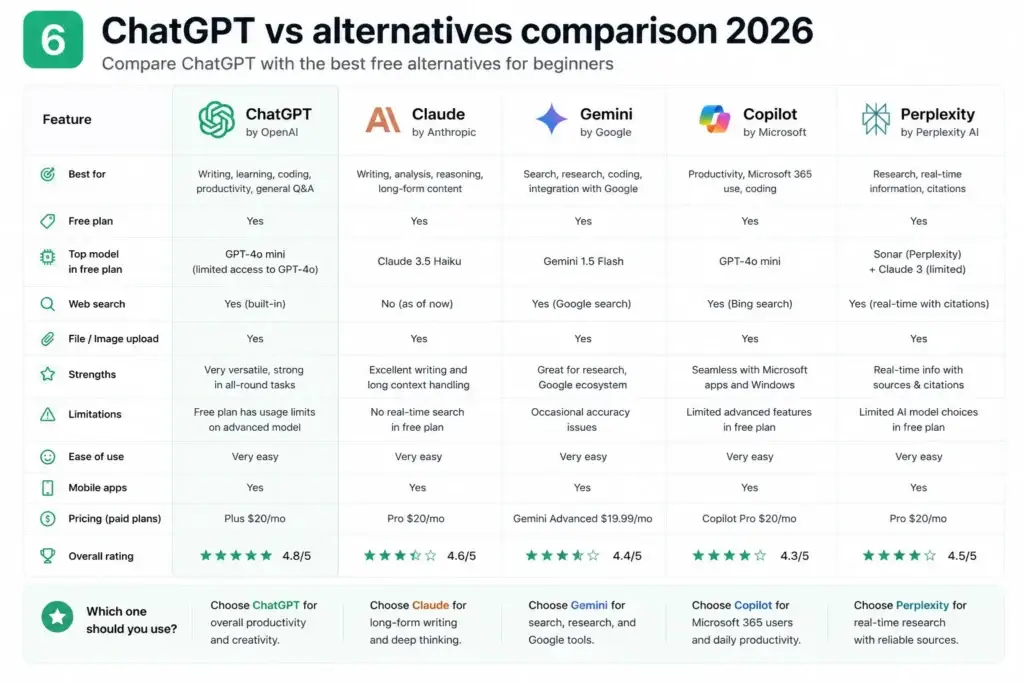
While this guide focuses on how to use ChatGPT for beginners, it is worth knowing the free ChatGPT alternatives in 2026 that are genuinely worth trying — because different tools excel in different areas.
| Feature | ChatGPT | Claude | Google Gemini | Microsoft Copilot | Perplexity AI |
|---|---|---|---|---|---|
| Free plan | Generous | Generous | Unlimited | Unlimited | Unlimited basic |
| Credit card needed | No | No | No | No | No |
| Best for | Writing & versatility | Long documents | Google users | Office + images | Research |
| Image generation | Limited free | No | Yes | 15/day free | No |
| Live web search | Yes | Limited | Yes | Yes | Yes (best) |
| File uploads | Yes | Yes | Yes | Yes | Limited |
| Memory / context | Long context | Very long | Good | Good | Per-session |
| Beginner ease | ⭐⭐⭐⭐⭐ | ⭐⭐⭐⭐ | ⭐⭐⭐⭐⭐ | ⭐⭐⭐⭐⭐ | ⭐⭐⭐⭐ |
| Mobile app | iOS + Android | iOS + Android | Android native | Yes | iOS + Android |
| Custom instructions | Yes | Yes | Limited | Limited | No |
When to Use Free ChatGPT Alternatives Instead
Use Claude when you need to work with very long documents. Claude accepts up to 200,000 tokens in a single conversation — far more than ChatGPT’s free tier. For summarising lengthy reports, contracts, or books, Claude is the best free ChatGPT alternative in 2026 for that specific task.
Use Google Gemini when you live inside Google Workspace. Gemini integrates directly into Gmail, Google Docs, and Google Drive — making it the most frictionless option for anyone whose work already happens inside the Google ecosystem.
Use Microsoft Copilot when you need free image generation or use Microsoft Office. Copilot runs on GPT-4 and includes 15 free DALL-E 3 images per day — something ChatGPT’s free plan does not offer.
Use Perplexity AI when you need sourced, verified facts. Perplexity is the best free ChatGPT alternative for research in 2026 because it cites every claim with a real source, making fact-checking immediate.
However, for most beginners learning how to use ChatGPT for the first time, starting with ChatGPT itself remains the best choice. Its combination of capability, ease of use, and the widespread availability of tutorials and prompt guides makes it the most supported learning path in 2026.
→ See also: Top 10 Free AI Tools for Beginners in 2026
Common Mistakes When Learning How to Use ChatGPT
Most beginners who are disappointed by their first experience with ChatGPT for beginners are making one or more of these five common mistakes:
Mistake 1: Being Too Vague
The most common mistake when learning how to use ChatGPT is writing a one-sentence prompt with no context. “Write a blog post” will always produce a generic, mediocre result. “Write a 1,000-word beginner guide about setting up Google Analytics for a small business owner who has never used it” will produce something genuinely useful.
Mistake 2: Accepting the First Output
ChatGPT’s first response is a starting point, not a finished product. One of the most important ChatGPT tips for beginners is to treat every output as a first draft that you refine through follow-up prompts. “Make it shorter,” “Change the tone to be more confident,” “Add two more examples” — these follow-ups take 10 seconds and dramatically improve results.
Mistake 3: Not Providing Examples
When you want ChatGPT to match a specific style, paste an example of writing you like and say “Write in this style.” This is the fastest and most reliable way to make ChatGPT write like you or like any voice you admire.
Mistake 4: Using It Only for One Thing
Most beginners learning how to use ChatGPT for beginners start by using it for one task and never explore its full range. Within your first week, try using it for at least five different things: writing, summarising, brainstorming, explaining, and planning. This rapid exploration is the fastest way to discover where ChatGPT saves you the most time in your specific situation.
Mistake 5: Treating It as a Search Engine
ChatGPT is not Google. It does not retrieve real-time information (unless you specifically ask it to search the web). Asking “What is the latest news about [topic]?” will often give you outdated information. Use Perplexity AI or activate ChatGPT’s web search mode for current facts. Use ChatGPT for creative and analytical tasks where its real strengths lie.
Frequently Asked Questions About How to Use ChatGPT for Beginners
Q: Is ChatGPT free for beginners?
A: Yes. ChatGPT for beginners is completely free to use with no credit card required. The free plan includes access to GPT-4o mini with unlimited messages and GPT-4o (the more powerful model) at 40 messages per 3 hours. For most beginners, the free plan is more than sufficient to get genuine daily value from the tool.
Q: How do I use ChatGPT for beginners with no experience?
A: Learning how to use ChatGPT for beginners with no experience is easier than most people expect. Go to chat.openai.com, create a free account with your email or Google login, and type any question or request in plain English. There is no technical knowledge required. The only skill you need is the ability to describe what you want — and that improves naturally the more you use it.
Q: How do I make ChatGPT write like me?
A: The best way to make ChatGPT write like you is to use the Custom Instructions feature. Click your profile in the bottom-left corner, select Custom Instructions, and describe your writing style, tone, audience, and preferences. Once set, ChatGPT automatically applies your style to every conversation without you needing to re-explain it each time.
Q: What is the best ChatGPT prompt for beginners to start with?
A: The best first ChatGPT prompt for beginners is one that matches something you actually need to do today. Try: “I am a beginner. Explain [topic you need to understand] in simple language with a practical example.” The key is starting with a real task rather than a test question — you learn how to use ChatGPT fastest when you are solving a real problem.
Q: Are there better free ChatGPT alternatives in 2026?
A: Several free ChatGPT alternatives in 2026 are excellent for specific tasks. Claude is better for very long documents. Perplexity AI is better for sourced research. Microsoft Copilot is better for free image generation. Google Gemini is better for Gmail and Docs users. However, for overall versatility as a starting point, ChatGPT remains the best choice for most beginners in 2026.
Q: How many times can I use ChatGPT for free per day?
A: On the free plan, ChatGPT gives you unlimited messages using the GPT-4o mini model and approximately 40 messages every 3 hours using the more powerful GPT-4o model. For most beginners learning how to use ChatGPT, the free tier provides more than enough capacity for daily use.
Q: Can I use ChatGPT on my mobile phone?
A: Yes. ChatGPT has a free app for both iOS and Android that includes all the features available on the web version. Download the official ChatGPT app by OpenAI from your app store. This makes ChatGPT for beginners accessible anywhere — on commute, during breaks, or any time you need a quick AI assist on your phone.
Q: What is the difference between ChatGPT and ChatGPT Plus?
A: The free version of ChatGPT gives you access to GPT-4o mini (unlimited) and GPT-4o (40 msgs per 3 hrs). ChatGPT Plus ($20/month) gives you unlimited GPT-4o, faster response speeds, and priority access during peak times. For anyone learning how to use ChatGPT for beginners, the free plan is the right starting point — upgrade only if you find yourself consistently hitting the message limits.
Final Thoughts: You Now Know How to Use ChatGPT for Beginners
You have covered everything you need to know about how to use ChatGPT for beginners in 2026:
- How to create your free account and navigate the interface
- How to write effective prompts that get useful results
- How to make ChatGPT write like you with Custom Instructions
- The best ChatGPT prompts for beginners across writing, research, and business
- ChatGPT prompts for small business owners who want to save time
- Advanced ChatGPT tips for beginners that most users never discover
- How ChatGPT compares to the best free ChatGPT alternatives in 2026
- The five most common mistakes to avoid from day one
The only thing left is to open chat.openai.com and start your first conversation.
Learning how to use ChatGPT for beginners is not a one-day project. It is a habit you build. The first time you use it, you will see possibility. The tenth time, you will see efficiency. The hundredth time, you will wonder how you managed your work before it existed.
Start with one task today. Use this guide to how to use ChatGPT for beginners whenever you need a refresher. And come back to Getfuturix for guides on every other AI tool worth knowing in 2026.
The future is already here. Now you know how to use it.
Found this guide to how to use ChatGPT for beginners useful? Share it with someone who needs it — and explore our full library of beginner AI tutorials at Getfuturix.com.
Related articles: