Ask five different AI productivity reports how many hours AI actually saves you, and you’ll get five different answers. That’s not because the research is bad. It’s because the honest answer depends entirely on what you’re using it for.
We pulled the real numbers — from the Federal Reserve, McKinsey, a randomized trial published in Science, and a 2025 study that found something most productivity content conveniently leaves out. Here’s what AI tools that save the most time in 2026 actually look like, ranked by task, not by marketing copy.
Table of Contents
Why “AI Saves X Hours” Numbers Are All Over the Place
Here’s the first honest thing to know before trusting any number in this space: the range is genuinely enormous, and that’s not a red flag — it’s the actual finding.
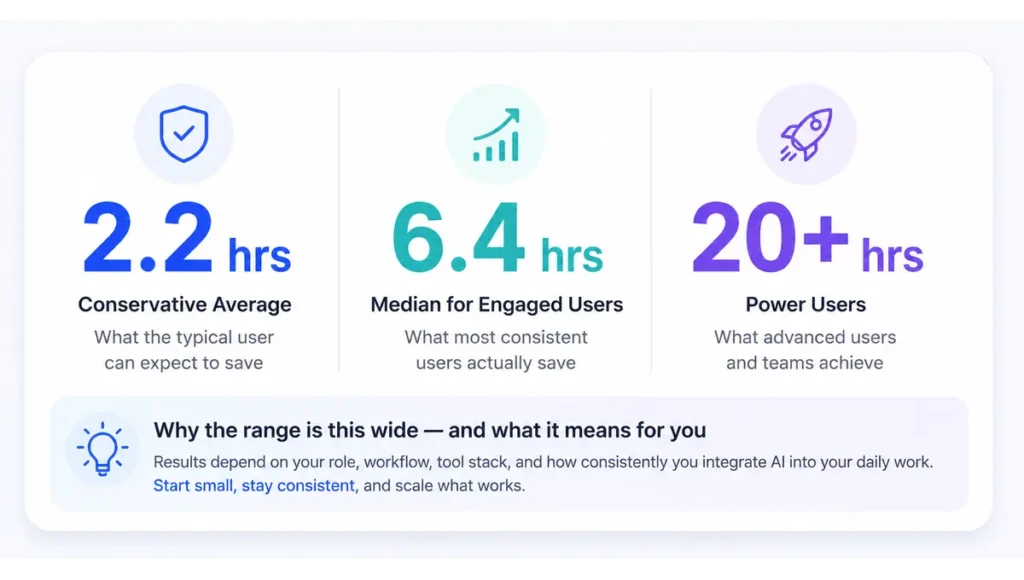
The Federal Reserve Bank of St. Louis put the population-wide average at 5.4% of weekly work hours, or about 2.2 hours in a standard 40-hour week. That’s a conservative, self-reported baseline across all AI users, casual and serious alike. McKinsey’s 2026 survey tells a different story for people who actually use AI tools regularly at work — a median of 6.4 hours saved weekly, with senior practitioners recovering 10 to 12 hours.
Then there’s the long tail. Some studies found 27% of frequent AI users save more than 9 hours a week, with power users reclaiming 20-plus hours by automating research, drafting, and admin work entirely. The gap between “casual user” and “power user” isn’t small. It’s the difference between a rounding error and a part-time job’s worth of hours back.
Ranked: AI Tools by Real Hours Saved
This is the actual ranking, built from controlled studies and large-scale survey data — not a single vendor’s self-reported case study.
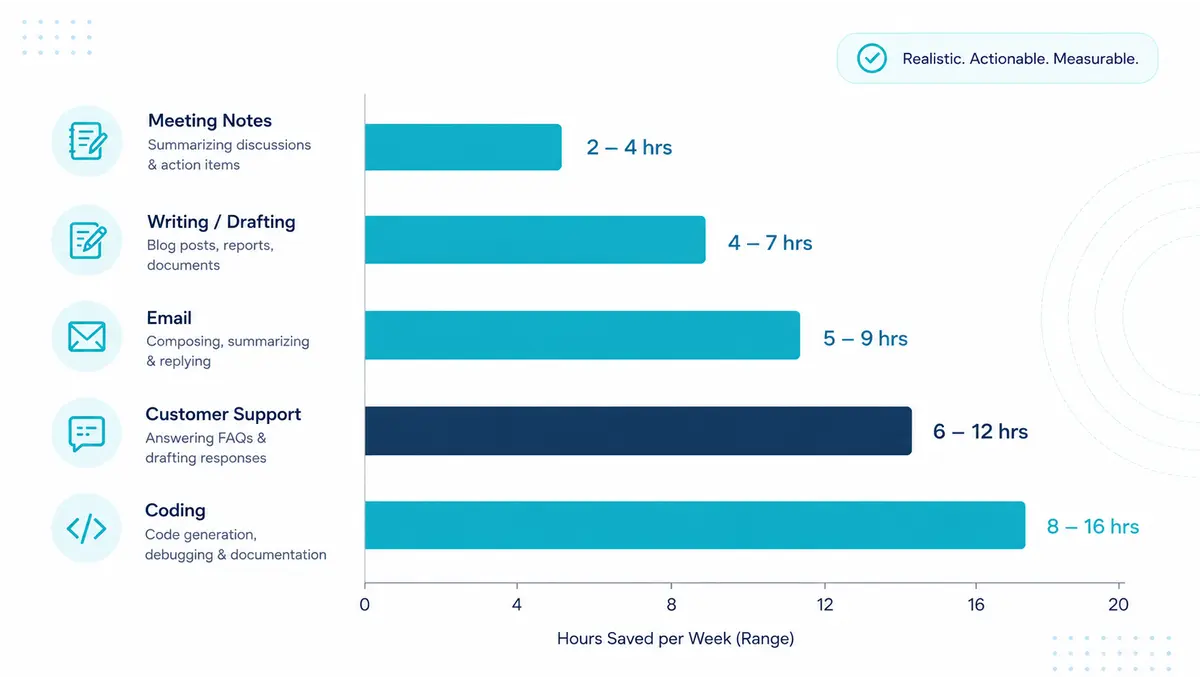
1. Meeting transcription and note-taking — the closest thing to a guaranteed win. This task goes from roughly 30 minutes of manual note-taking after every meeting to effectively zero, since AI transcription tools generate the summary live. There’s no real debate here. It’s structured, repetitive, and exactly the kind of task AI handles with almost no downside.
2. Email management — a genuine 3.6 hours a week. A 2025 NBER and Microsoft study found knowledge workers using generative AI tools saved 3.6 hours weekly on email specifically, a 31% reduction in time spent on that single task. This ranks high because email is universal — nearly everyone has this exact problem, and the fix is proven at scale.
3. Writing and drafting — a real 40% time cut, with quality actually improving. A randomized controlled trial published in Science in 2023 found ChatGPT cut professional writing time by 40% while raising quality by 18%. Separately, a Harvard Business School field experiment with BCG consultants found GPT-4 users completed 12.2% more tasks, 25.1% faster, at 40% higher quality. This is one of the most rigorously tested categories in the entire AI productivity space.
4. Customer support — real gains, concentrated in the people who need it most. A 2025 study in The Quarterly Journal of Economics found AI assistance raised customer support productivity by 15% on average — but the least experienced agents saw the largest gains, sometimes more than double the improvement seen by veteran staff. If you’re new to a role, this is where AI tools punch above their average weight.
5. Coding assistance — the most contested ranking on this list, and deliberately so. Nielsen Norman Group research found AI coding tools boosted output by 126% in certain measured tasks. But a 2025 randomized trial by METR found something the industry doesn’t like to advertise: experienced developers using AI tools were actually 19% slower on complex, familiar codebases — while believing they were 20% faster. Both findings are real. The honest ranking depends entirely on task complexity and your existing familiarity with the codebase, which is exactly why this sits lower than the other four.
The Counter-Finding Most Productivity Content Skips
Show Image
Here’s the part almost no “AI saves you X hours” article mentions, and it’s arguably the most important finding in this entire space.
The 2025 METR trial wasn’t measuring casual users. It measured experienced developers working on codebases they already knew well — and found they were measurably slower with AI tools, despite genuinely believing the opposite was true. That gap between perceived speed and actual speed is the single biggest reason self-reported productivity surveys need to be read carefully.
A separate finding from the Upwork Research Institute adds another honest wrinkle: 77% of freelance workers using generative AI said it added to their workload rather than reducing it, mostly due to the review and validation time needed to check AI output before using it. This isn’t an argument against AI tools. It’s a reminder that the “hours saved” number only holds up if you’re using AI for tasks where checking the output is genuinely faster than doing the task manually — which is exactly why our ranking above puts structured, low-ambiguity tasks like meeting notes and email at the top, and open-ended, high-stakes coding further down.
Best AI Productivity Tools 2026 by Task Category
Different tools solve different problems on this list. Here’s the honest breakdown by what each one is actually best at.
| Task Category | Realistic Hours Saved/Week | Best Suited Tool Type | Key Caveat |
|---|---|---|---|
| Meeting notes/transcription | ~2–4 hours | AI transcription and summary tools | Near-zero downside, structured task |
| Email management | 3.6 hours | AI email drafting assistants | Gains concentrate on repetitive replies |
| Writing and drafting | 40% time reduction | ChatGPT-style writing assistants | Quality improved alongside speed in RCT |
| Customer support | 15% average, higher for novices | AI copilot tools for support agents | Least-experienced staff benefit most |
| Coding | Highly variable, task-dependent | AI coding assistants | Can be slower on complex, familiar code |
The realistic takeaway from this table: the tools with the most reliably ranked hours saved are the ones handling structured, repetitive, low-ambiguity work. The moment a task requires deep familiarity or high-stakes judgment, the “hours saved” promise gets a lot less certain — and the data backs that up directly.
How Much Time Does AI Actually Save You, Specifically
The honest answer: it depends far more on your specific tasks than on which tool you pick.
If your week is full of meetings, email, and first-draft writing, you’re squarely in the category where AI’s time savings are most rigorously proven — expect somewhere in the realistic 3 to 8 hour range weekly once the tools are actually part of your routine, not just installed and forgotten. If your work involves complex, high-context tasks you already know well — deep coding on a familiar system, nuanced strategic writing — go in with tempered expectations and measure your own before-and-after rather than trusting an average that wasn’t built around your specific situation.
The single best way to find your real number: pick one repetitive task this week, time yourself doing it manually once, then time the AI-assisted version including the review and edit pass. That real, personal comparison beats any survey average — including the ones in this article.
Frequently Asked Questions about AI Tools That Save the Most Time in 2026
Q: What are the AI tools that save the most time in 2026?
A: Based on controlled studies rather than vendor marketing, the highest-confidence time savings come from meeting transcription and note-taking tools (near-total elimination of manual notes), AI email assistants (3.6 hours weekly per NBER/Microsoft research), and AI writing tools (a 40% time cut with improved quality, per a 2023 Science randomized trial). AI tools that save the most time in 2026 cluster around structured, repetitive tasks rather than open-ended, high-context work.
Q: How much time does AI actually save on average?
A: The Federal Reserve Bank of St. Louis found a conservative population-wide average of 2.2 hours per week (5.4% of work hours). McKinsey’s 2026 data shows a higher median of 6.4 hours for regular users of AI tools in production workflows, with senior practitioners saving 10 to 12 hours weekly. How much time does AI actually save depends heavily on how consistently you use it and which tasks you apply it to.
Q: Do AI coding tools really save developers time?
A: It’s genuinely mixed, and this is one of the more important nuances in the data. Some research shows AI coding tools boosting output significantly, while a 2025 METR randomized trial found experienced developers were 19% slower on complex, familiar codebases while believing they were faster. AI tools ranked by hours saved in the coding category depend heavily on task complexity and how well you already know the code you’re working in.
Q: Does AI save time on meeting notes and transcription?
A: Yes, and this is one of the most reliably proven use cases in this entire category. Manual note-taking typically takes around 30 minutes after every meeting; AI transcription tools generate a usable summary live, dropping that time close to zero. AI meeting notes vs manual notes is one of the clearest wins in the productivity data, with almost no offsetting review burden.
Q: Why do some studies say AI adds work instead of saving time?
A: The Upwork Research Institute found 77% of freelance workers using generative AI reported it added to their workload, mainly due to reviewing and validating AI output before using it. This matters because the “hours saved” figure only holds up when the review process is genuinely faster than doing the task manually — which is true for structured tasks like email and transcription, and less certain for complex or high-stakes work.
Q: What’s the best AI productivity tool for time management in 2026?
A: There isn’t one universal answer — the best AI tools for time management depend on which specific task is eating your week. If it’s meetings, an AI transcription tool delivers the clearest, most proven time savings. If it’s email or first-draft writing, AI writing assistants have the strongest controlled-study backing. Match the tool to your actual biggest time drain rather than picking the most talked-about option.
The clearest pattern across every study we found: AI saves the most time on structured, repetitive tasks, and the least — sometimes negative — time on complex work you already know well. That’s not a limitation to work around. It’s the map for where to actually point these tools first.
Pick your biggest repetitive time drain this week. Time yourself doing it manually once. Then time the AI-assisted version, review pass included. That’s the only “hours saved” number that actually matters — the one you measured yourself.
Want more honest, data-backed AI guides? Browse our full library at GetFuturix.com.
Related articles on GetFuturix: